Learn exactly what web crawlers are and how they work. Discover how search engine bots fetch your pages, manage crawl budget, and track crawling in Google Search Console.
Let’s say you just launched a brand new category page on your e-commerce site.
You made sure it’s linked from your homepage.
Search engines have discovered this webpage in the Discovery Phase.
But your work isn’t done yet.
Because finding a URL is only the very first step.
Next, search engines actually have to read what is on that page.
This process is called crawling.
If a bot discovers your page but never crawls it, you still won’t rank.
And if they don’t crawl it, you won’t get a single drop of organic traffic.
Here is exactly how web crawlers work, and how to make sure they are reading your most important content.
What Is A Web Crawler?
To understand crawling, you have to understand bots.
Search engines use automated software.
We call them bots, spiders, or crawlers.
These crawlers are basically data-fetching machines.
Google’s primary crawler is called Googlebot.
Its entire job is to travel across the web, download the HTML content of webpages, and send that data back to Google’s servers to prepare it for indexing phase.
They hop from one URL to another.
Constantly mapping connections.
But they don’t do this randomly.
They operate on a highly organized, algorithmic schedule.
How Does The Crawling Process Actually Work?
Let’s say Googlebot finds a fresh link pointing to your new article.
It doesn’t instantly drop everything to read your page.
Instead, it adds your URL to a massive list.
This list is called the crawl queue.
The crawl queue is constantly prioritizing which URLs to fetch next based on authority, update frequency, and demand.
When your URL finally reaches the front of the line, the crawler makes an HTTP request to your server.
It asks your server to hand over the page’s code.
If your server responds with a “200 OK” status, the crawler downloads the content.
Then, it looks at all the text, the images, and the links.
It extracts all the new links on that page.
And adds those new links directly into the crawl queue.
And the cycle continues.
The Role of Crawl Budget
Google does not have infinite server resources.
They cannot crawl every single page on the internet every single day.
So, they assign a “Crawl Budget” to your website.
This is the number of pages Googlebot can and wants to crawl on your site within a specific timeframe.
If you have a massive site with millions of pages, crawl budget is critical.
If your server is slow, Googlebot will slow down.
Because it doesn’t want to crash your website.
And if you waste your crawl budget on low-quality pages, bots might leave before they ever reach your money pages.
Why Site Authority Matters for Crawling
Not all websites are treated equally.
Highly trusted, massive websites get crawled constantly.
The more backlinks a page or domain has, the more authoritative it may seem to Google.
Especially if those backlinks come from domains that are authoritative themselves and you read our guide about Backlinks and How to build Links Naturally.
Semrush measures a website’s authority with a metric called Authority Score.
It’s based on the quality and quantity of backlinks, organic traffic levels, and the naturalness of the site’s entire backlink profile.
High authority means high crawl rates.
If a high-authority site links to you, bots will prioritize your URLs in the crawl queue.
And they will crawl your new pages much faster.
Why Do Crawlers Ignore Certain Pages?
Sometimes, a bot discovers your page.
But it actively refuses to crawl it.
You have to know why this happens.
Blocked by Robots.txt
Before a bot even attempts to discover or crawl your site, it checks your rules.
It looks for a file called robots.txt.
This file tells search engines where they are allowed to go, and where they are forbidden.
Let’s say you accidentally blocked your blog folder in your robots.txt file.
Googlebot will arrive at your site.
It will read the file.
And it will immediately stop.
It won’t even try to crawl those pages.
Always double-check that your most important pages are accessible.
Server Errors
Let’s say Googlebot tries to fetch your page, but your server is down.
It will receive a 500-level error code.
The bot will immediately back off.
If this happens too often, Google will drastically reduce your crawl budget.
Because they think your server can’t handle the traffic.
Orphan Pages
Your own website is a web.
If you publish a new post but don’t link to it from any of your existing pages, you create an “orphan page”.
Bots have a terrible time finding orphan pages.
Because there is no internal path leading to them.
Always link to your new pages from your older, already-indexed pages.
Just log into your CMS.
Find a related older post that already gets traffic.
And add a natural link pointing to the new URL.
How to Check Crawl Status in Google Search Console
So, how do you know if Google actually crawled your page?
You check Google Search Console.
Here is exactly how to do it.
First, log into your Search Console dashboard.
Look at the very top of the screen.
You will see a search bar that says “Inspect any URL in…”.
Just enter your newly published URL right there.
Hit enter.
Google will fetch the live data from their index.
Look at the “Page indexing” section right below the main result.
If the status says “Crawled – currently not indexed,” you have passed the crawling phase.
The bot successfully downloaded your page.
It just hasn’t had the time to fully render and add it to the search results yet.
But what if you want to see your site’s overall crawling health?
You need to check your Crawl Stats.
Go to the left sidebar in Search Console.
Scroll all the way down to the Settings tab.
Click on it.
Look for the Crawl stats section in the middle of the screen.
Click Open Report.
This will show you exactly how many requests Googlebot is making to your server every single day.
You will see a large timeline graph of your total crawl requests.
Below the graph, look at the By response card.
Make sure the vast majority of your requests are returning an “OK (200)” status As shown in the image below from one of my Google Search Console properties :
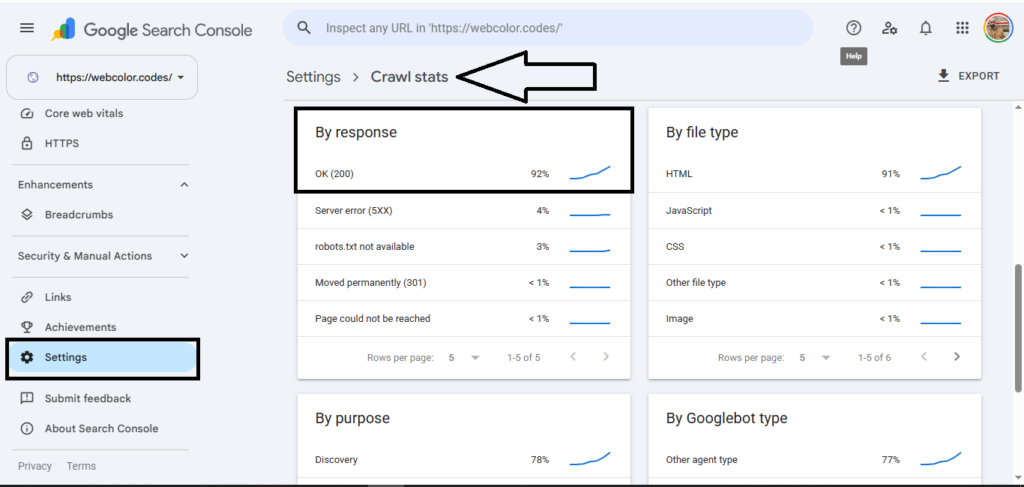
And it’s clearly that out the requests Googlebot is sending out to my website, 4% of these requests respond with 5XX Server-Level Errors.
If you see a sudden spike in “Server error (5xx)” or “Not found (404),” you have a technical problem.
And you need to get your developers to fix it immediately.
Before search engines stop crawling your site altogether.
Updated On :