Crawled – currently not indexed means that Googlebot or Google Systems successfully discovered , fetched and crawled your webpage, but Google Systems decided not to include this page in it’s index, this error is a part of Google Search Console Page Indexing report.
And in this article we will discuss all the possible practical solutions you can apply in order to make this error successfully resolved from Google Systems’ end.
TLDR; – “Crawled – currently not indexed” Fixations and Recommendations
- Verification of “Live State” of the URL itself, does it return 200 Status OK Or other Status codes
- Identification of “Parameters Bloat” Issue Within your website, like indexation of filters, colors, prices, etc .. if you are running an ecommerce store with big products catalog or a big website with dynamic controls to filter your content, etc.
- Checking for any Canonicalization Issues or conflicts within your Canonical Tags, as this can send discrepancies for Google Indexing Systems
- Assessment of your Rendering Issues especially if your website make heavy use of JavaScript like most modern framework.
- Creating Internal links from popular webpages on your website to these or this page in particular
- Updating the content with real and sufficient updates not just rewording or rephrasing for 2 sentences or so, by updating means, adding real-world perspectives, opinions , what other says about this topic, cite expert quotes from social media and so of these activities.
- Adding Media to a “Text-Only” or Big wall of text can really make a big difference and move the needle, as the media itself can deliver the message better than words and also media resets user attention after reading a specific paragraph , then followed by a media to explain what discussed in this paragraph, this is very good to make your webpages engaging and helpful.
- Sharing on Social Media Channels; Googlebot shows a high crawling activity and history for Social Media Channels, you can make use of this to post a content with the URL which is “Crawled – currently not indexed” with a relevant and popular hashtags , this helps a lot in indexing of URLs.
Table of Contents
What Does “Not Indexed” Means?
In practical this error called “Crawled – currently not indexed” is an error appears in Google Search Console and Specifically within the Page Indexing Report, within this error context “Not Indexed” means Google Systems due to internal reasons regards the page quality or other reasons to not include this webpage in their index, which also means if you took that particular URL and searched it through Google, it will return Zero Results.
This means “Not Indexed”, this Error also can not only happen for new published URLs , personally on a website I was managing it’s SEO and still , big part of URLs were already in the index and later on Google Systems decided to remove these URLs from their index “In My Case”, as shown in the image below from this website Google Search Console, Page Indexing Report :
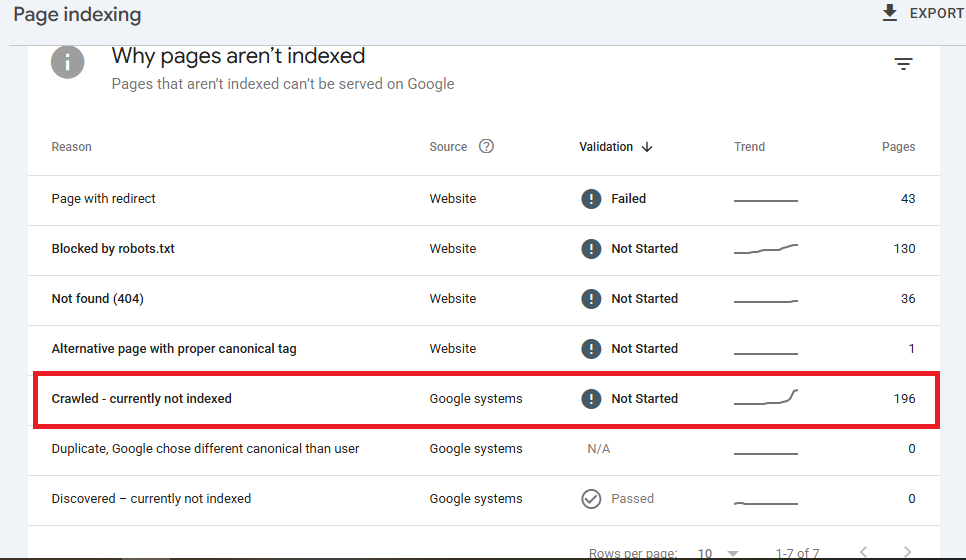
Why? Because, these URLs were already existing in Google Index and then Google decided to in bulk remove these URLs and mark them up with “Crawled – currently not indexed” in my Google Search Console for this website.
Now, let’s proceed with practical fixations and recommended steps I have personally follow every to make these “Crawled – currently not indexed” issue to be resolved successfully.
1 – Verification of URL Live State
Before diagnosing anything deeper, confirm the URL is genuinely alive and reachable exactly the way Googlebot experiences it, not the way your browser cache shows it to you.
Run a technical URL validation pass and confirm the page returns a clean HTTP 200 status code, not a soft 404, a redirect chain, or an intermittent 5xx error surfacing under server load.
Use Google Search Console’s URL Inspection tool and pull the “Live Test” diagnostics separately from the last indexed version, since these two can diverge if Google last crawled the page months ago.
Cross-check this with server-side response tracking through your access logs, since logs often reveal Googlebot receiving a different status code than a manual browser check returns.
Inconsistent responses based on user-agent or headers signal unreliability, and Google deprioritizes indexing for URLs it cannot trust to respond consistently.
There are many ways to check the live status code of any specific URL this one is my favorite “HTTP Status Code Checker“
2 – Identification of Parameter Bloat Or Indexing Bloat
Google allocates a finite Crawl Budget to every website, and bloated URL structures burn through that budget on pages carrying little unique value.
To quickly spot or identify Parameters blot or indexing bloat, for example, you if you got 1000 Products in your Products Catalog and you’ve found number of URLs in the Page Indexing report exceeds this number for example 100K Pages “Crawled – currently not indexed”, then probably Googlebot began to include variations, prices, SKUs and different forms of products variables into their index, causing what is so-called “Indexation Bloat”.
This guide from Search Engines Land about “Index Bloat” , read it to learn more about the use-cases where index bloat occurs.
Start by auditing faceted navigation control across filters, sort orders, colors, sizes, and price ranges, since each combination can spawn a near-duplicate URL competing with your canonical product or category page.
Review URL parameter handling in Search Console’s legacy reports or server logs to identify which parameters are actually crawled versus which should be blocked via robots.txt or canonical tags.
For large catalogs, dynamic routing efficiency matters just as much as static architecture, since poorly configured routes generate near-infinite URL variations.
This is especially common as e-commerce indexing bloat, where thousands of thin, duplicate parameterized URLs dilute crawl priority away from pages you actually need indexed, pushing genuinely valuable ones into the “crawled currently not indexed” bucket.
3 – Checking Canonicalization Issues
Canonical Tags are one of the most overlooked culprits behind this error, because a single misconfigured canonical tag can silently tell Google to ignore a page you actually want to index.
Start by checking for duplicate content resolution issues, where near-identical pages lack a clear self-referencing canonical, forcing Google to pick a “master” version on its own, not always the one you intended.
Watch closely for cross-domain canonical conflicts, particularly with staging environments, syndicated content, or multiple regional domains, since a stray canonical pointing outward can quietly deindex your primary page.
The goal is master URL consolidation, ensuring every duplicate or near-duplicate variant points cleanly to one authoritative version.
Audit this at scale using a crawler, not manual spot checks, since canonical errors rarely appear on just one page and usually reveal a templating issue affecting hundreds of URLs.
4 – Assessment of Rendering Issues
If your site leans on JavaScript frameworks like React, Vue, or Angular, rendering issues become a prime suspect behind “crawled currently not indexed.”
Run proper JavaScript SEO diagnostics by comparing the raw HTML response against the fully rendered DOM, since Google must execute your client-side rendering (CSR) payloads before evaluating actual content, and this second pass is resource-constrained and not guaranteed to happen quickly.
Use the URL Inspection tool’s rendered screenshot and HTML output to confirm critical content, links, and metadata actually appear post-render, not just in the initial response.
Watch DOM rendering timelines too, since content injected late through slow API calls or lazy-loaded scripts can time out before Googlebot finishes rendering.
This ultimately comes down to framework indexability, and where possible, server-side or static rendering removes this uncertainty entirely.
5 – Creating Internal Links
Orphaned or weakly linked pages send Google a quiet signal that the content is not important enough to prioritize, so strong Internal Links structure is one of the fastest levers you can pull.
This is not about outdated PageRank sculpting tactics like nofollowing internal links, but about genuinely strengthening hub page distribution by linking from your highest-authority, most-crawled pages to the affected URL.
Think in terms of link equity flow, tracing how authority moves from your homepage and top category pages down through your site hierarchy to reach the page in question.
If a page sits five clicks deep with no contextual links, that effectively tells Google it does not matter.
Add relevant links from related articles and high-traffic hubs, and consider site hierarchy optimization broadly so future pages avoid the same trap.
6 – Updating Content (EEAT & Information Gain)
Google increasingly evaluates pages against an implicit information gain score, essentially asking whether this content adds something the existing top results do not already say.
Rewording two sentences will not move that needle. Genuine updates mean strengthening E-E-A-T signals directly on the page: real experience-based commentary, expert quotes pulled from social platforms or interviews, original data, and topical depth that goes beyond a surface-level rehash of competitors.
Semantic enrichment matters too, expanding coverage of related entities and questions users actually ask, rather than repeating the same idea in different phrasing.
Ask what a genuine subject-matter expert would add that a generic rewrite would not: a caveat, a counterpoint, a number nobody else cited.
Pages that fail this bar often get crawled fine but never earn the quality signal needed for indexing.
7 – Adding Media
A page that is nothing but unbroken paragraphs signals low effort and low usefulness, both to readers and, indirectly, to Google’s quality systems.
Multimedia content integration, original images, custom diagrams, screenshots, or embedded video, breaks up dense text and reinforces the message rather than just decorating the page.
This directly affects user experience (UX) signals, since visitors who land on a wall of text tend to bounce quickly, while well-placed media resets attention and encourages continued reading.
And you can furthermore read this article by Semrush Blog and it explains How SEO and UX Correlates.
That extended engagement feeds directly into dwell time optimization, which correlates with how Google assesses a page’s value against competing results.
Treat media placement as visual information architecture: introduce a concept in text, then reinforce it with a relevant image or chart before the next section.
Pages alternating text and media consistently outperform text-only competitors on engagement and indexing outcomes.
8 – Sharing on Social Media Channels
Sharing the URL across social media channels will not directly influence rankings, since links from most platforms carry a nofollow attribute, but it plays a real role in crawl discovery.
Google’s crawlers do not only follow your sitemap, they also pick up fresh URLs surfacing through external signals, and social shares are one of the fastest ways to expose a page outside your own domain.
This is useful as a re-crawl trigger, since a page sitting quietly with no external activity can wait far longer in the crawl queue than one generating clicks and traffic.
Distributing the page through LinkedIn, X, or niche communities also produces real engagement and referral traffic Google can observe indirectly.
Pair this with the expert citations from step six, since social platforms are often exactly where you sourced those quotes, closing the loop between content and distribution.
Crawled – currently not indexed vs Discovered – currently not indexed : What Is The Difference?
Both of them falls under the “Page Indexing Report” In Google Search Console, but the main key difference is ; Crawled – currently not indexed is a matter of Quality Threshold of the webpage meanwhile Discovered – currently not indexed Error telling you that these page/s discovered by Googlebot and didn’t Crawled Yet to be indexed in the Search.
In Conclusion
Crawled – currently not indexed error in Google Search Console is not about a technical issue, rather it’s about the Quality Threshold of this webpage didn’t meet what Google Systems is looking for and accordingly you need to tweak things like we mentioned and discussed above.
Beside the techniques we discussed above, it’s also important to consider implementing the basics of SEO, understanding how search engines works. And don’t forget to expand your knowledge about :
And don’t forget to subscribe to Search Engines Daily to our Weekly SEO Newsletter to get the SEO , AI And Search Marketing Updates directly into your inbox “We don’t spam”.